Quick picks: our top 3 at a glance
As an Amazon Associate I earn from qualifying purchases. Prices and availability change.


Choosing the right keyboard is essential for getting the most out of a compact desktop, especially when space is limited and every cable adds clutter. If you are building a small workstation, a home theater PC, or a travel-friendly setup, the best wireless keyboard for mini pc can make every interaction smoother and more enjoyable. In November 2026, we evaluated 6 leading models from Logitech, EASYTONE, TECKNET and more, focusing on connection reliability, typing comfort, portability, and ease of use. Whether you need a simple plug-and-play solution or a backlit mini keyboard with a built-in touchpad, this guide will help you narrow down the options.
A good wireless keyboard can transform a mini PC into a practical home office tool or living room entertainment hub. Before you choose a keyboard, it also helps to know what you want from the desktop itself. For an overview of the best compact desktops to pair with your new keyboard, take a look at our best mini PCs guide.
At a Glance
| Product | Brand | Rating | Where to buy |
|---|---|---|---|
| TECKNET 2.4G Compact Wireless Keyboard | TECKNET | 4.5 / 5 | View on Amazon |
| TECKNET 2.4G Mini Wireless Keyboard and Mouse | TECKNET | 4.5 / 5 | View on Amazon |
| Logitech K400 Plus Wireless Touch TV Keyboard | Logitech | 4.3 / 5 | View on Amazon |
| Easytone Mini Wireless Keyboard/Touchpad Combo | EASYTONE | 4.4 / 5 | View on Amazon |
| Rii X8 Mini Keyboard with Touchpad | Rii | 4.8 / 5 | View on Amazon |
| Macally Compact Wireless Keyboard (78-Key) | Macally | 4.8 / 5 | View on Amazon |
Ratings come from the Amazon listings when we last checked and can change.
Pros
- Compact, lightweight design fits easily in a bag or on a small desk
- Quiet, low-profile chocolate-style keys with reduced travel help minimize finger fatigue
- Plug-and-play 2.4GHz USB receiver provides a stable connection up to 32.8 feet
- Media hotkeys offer convenient control without extra software
- Up to 12-month battery life
Cons
- No Bluetooth support, so a USB-A port is required
- Uses two AAA batteries that are not included
- Non-standard Enter key layout may take time to get used to for full-size keyboard users
Pros
- Ultra-slim and lightweight design ideal for travel.
- Quiet keys and silent mouse clicks reduce distractions.
- Stable 2.4GHz wireless connection with up to 49ft range.
- Includes 12 multimedia hotkeys for quick access.
- Backed by a 36-month warranty.
Cons
- Compact size may not be comfortable for users with larger hands.
- Requires 4 AAA batteries (not included).
- No Bluetooth support; requires a USB-A port.
Pros
- Built-in touchpad removes the need for a separate mouse
- Wireless range up to 33 feet gives comfortable couch control
- Battery life up to 18 months and an on/off switch reduce power worries
- Spill-resistant design handles minor accidents
Cons
- Lacks backlit keys, so typing in a dark room is harder
- Connects through a USB receiver only, not Bluetooth
Pros
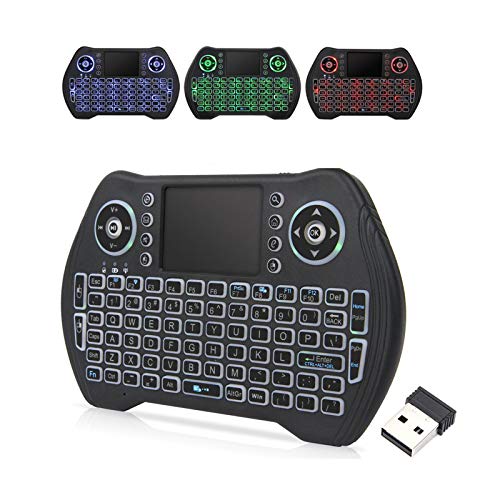
- Backlit keys with multiple colors for use in low light.
- Rechargeable Li-ion battery with auto sleep/wake saves on batteries.
- Wide compatibility with many devices (Android TV, PC, PS3, etc.).
- Sensitive multi-finger touchpad and 8 hotkeys for convenient control.
- Compact and lightweight design (0.24 lbs) for easy portability.
Cons
- Small keys may not be comfortable for extended typing sessions.
- Requires USB port or OTG cable for devices without one.
- Touchpad may be less precise than a dedicated mouse for detailed work.
Pros
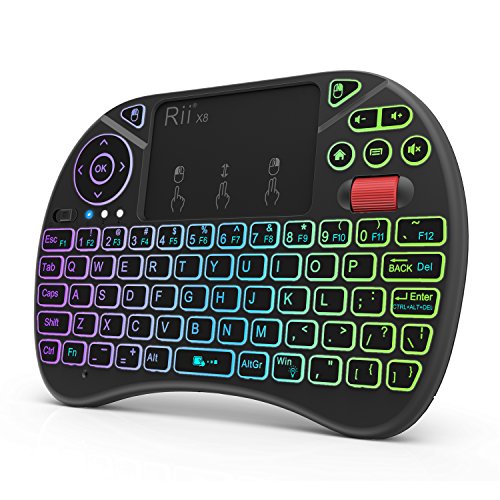
- Compact handheld design with built-in touchpad and mouse buttons
- RGB backlit keys for visibility in dark environments
- Rechargeable lithium-ion battery with included USB charging cable
- Works with a wide range of devices including Raspberry Pi and Android TV boxes
Cons
- Requires a Micro USB OTG cable for Amazon Fire TV 4K and Fire Stick compatibility
- No Bluetooth option, relies solely on 2.4G wireless via included dongle
Pros
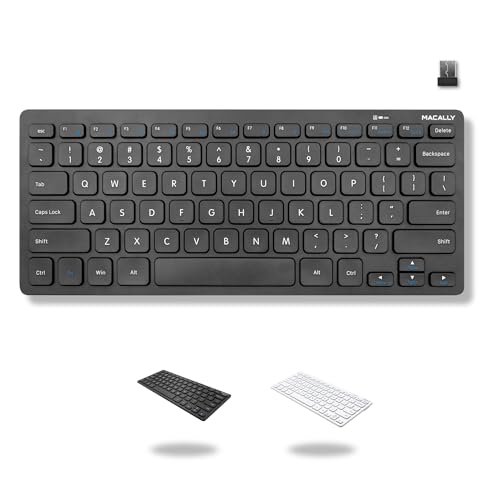
- Compact and lightweight design, ideal for travel and small workspaces.
- Reliable wireless connection via included 2.4Ghz USB dongle, no Bluetooth pairing needed.
- Plug-and-play with PC and Chromebook; no drivers or software required.
Cons
- Lacks a number pad, which may be a drawback for data entry or spreadsheet work.
- Requires a USB-A port and a AAA battery (included but not rechargeable).
- Not compatible with Mac or devices without a USB-A port.
Best Wireless Keyboard For Mini Pc Buying Guide: What to Look For in 2026
Not all wireless keyboards are created equal. The best wireless keyboard for mini pc for your setup depends on how you use your mini PC, whether that means daily productivity, media streaming, or casual gaming. Here are the key factors we considered while reviewing these 6 models.
Connection Type and Wireless Range
Most wireless keyboards for mini PCs use a 2.4GHz USB receiver because it is plug-and-play and provides a stable, low latency connection. This is a great match for Windows based mini PCs, Chromeboxes, and many Linux systems. Some models, like the TECKNET 2.4G Wireless Keyboard, use a dedicated receiver with a useful wireless range of up to around 33 feet. Others, such as the TECKNET Wireless Keyboard and Mouse Combo, use one nano receiver for both keyboard and mouse, which keeps USB ports free and reduces desk clutter. Bluetooth is another option, but it is less common on mini keyboards and can require extra setup. If you choose a receiver-based model, make sure your mini PC has a USB-A port or a compatible adapter.
| Connection Type | Best For | Example Models |
|---|---|---|
| 2.4GHz USB receiver | Plug-and-play use with stable performance | TECKNET, Macally, Logitech |
| 2.4GHz combo receiver | Saving USB ports with keyboard and mouse | TECKNET Wireless Keyboard and Mouse Combo |
| 2.4GHz receiver with touchpad | HTPC, smart TVs, and couch browsing | Logitech K400 Plus, Rii X8, Easytone |
Form Factor and Portability
Mini PCs are popular because they save space, and your keyboard should do the same. Compact wireless keyboards without number pads are ideal for small desks, dorm rooms, and travel bags. The Macally Compact Wireless Keyboard uses a 78-key layout with no num pad, which keeps the footprint small while still providing shortcut keys. If you plan to use your keyboard from the couch, an all-in-one mini keyboard with a touchpad is easier to hold. The Logitech K400 Plus Wireless Touch TV Keyboard includes a large touchpad, making it feel like a laptop keyboard for your TV. The Rii X8 Mini Keyboard takes this further with a small handheld design that is easy to store beside your media center.
For a more traditional desktop arrangement, a compact keyboard without a touchpad may be enough because you can pair it with a separate mouse. The TECKNET 2.4G Wireless Keyboard and the Macally Compact Wireless Keyboard both offer slim profiles that fit comfortably on a small desk. Think about where you will use the keyboard most. If you need to move between rooms, choose a lightweight model with a battery-friendly design. If you are creating a permanent home office, you can explore our home office mini PC recommendations to find a compatible desktop.
Keyboard Layout and Typing Comfort
Typing comfort can vary significantly from one compact keyboard to another. Pay attention to layout differences, especially the Enter key shape and the function row. Some small keyboards use a non-standard layout that may require an adjustment period. The TECKNET 2.4G Wireless Keyboard uses a chocolate keycap design with low profile keys and quiet tactile feedback, which helps reduce finger fatigue during longer sessions. The TECKNET Wireless Keyboard and Mouse Combo takes a similar approach with responsive scissor-switch keys shaped to match your fingertips.
If you type long emails, write documents, or manage spreadsheets, a full-size layout may still be tempting, but a compact keyboard can be just as comfortable once you adapt. The Macally Compact Wireless Keyboard includes 12 shortcut keys in a slim frame, giving you quick access to common tasks without adding bulk. The Logitech K400 Plus uses quiet keys and a spacious touchpad, which is convenient for navigating media apps from a distance. For the best experience, try to match the keyboard size to your desk setup and personal typing style. Some compact models have a smaller right Enter key, so make sure you are comfortable with that design before buying.
Battery Life and Power Management
Long battery life reduces interruptions, and good power management can make a wireless keyboard feel effortless. The Logitech K400 Plus is designed for long battery life and includes an on/off switch to help preserve power when the keyboard is not in use. The TECKNET 2.4G Wireless Keyboard is also built for extended use, with a reported battery life of up to 12 months. Rechargeable options are even more convenient for some users. The Easytone Backlit Mini Wireless Keyboard comes with a built-in rechargeable Li-ion battery, while the Rii X8 Mini Keyboard includes a lithium polymer battery that can be charged through a USB cable.
Auto sleep is another important feature to look for. The TECKNET Wireless Keyboard and Mouse Combo enters sleep mode when inactive and wakes instantly when you press a key or click the mouse. The Rii X8 also supports automatic sleep and wake-up, which is useful for media center setups where the keyboard may sit idle for long periods. If you want to avoid changing batteries often, choose a model with a rechargeable battery or one with a generous battery life and an on/off switch.
Compatibility and Operating System Support
Most wireless keyboards for mini PCs work with Windows, macOS, Chrome OS, Linux, and Android TV boxes, but there are some exceptions. For example, certain multimedia hotkeys may not be fully supported on macOS. The TECKNET Wireless Keyboard and Mouse Combo specifically notes that its multimedia shortcut functions are not fully compatible with Mac OS. If your mini PC runs Windows or Chrome OS, most of these keyboards will be plug-and-play. The Macally Compact Wireless Keyboard is designed for PCs and Chromebooks with a USB-A port and requires no drivers or software.
If you plan to use the keyboard with a smart TV, Android TV box, or HTPC, look for models with broad compatibility and a touchpad. The Easytone Backlit Mini Wireless Keyboard supports Android TV boxes, smart TVs, PCs, and HTPC systems. The Logitech K400 Plus is compatible with Windows, Android 7 or later, and Chrome OS, making it a versatile choice for media-oriented mini PCs. For a streaming or living room setup, our guide to the best mini PC for streaming Twitch can help you choose a desktop that matches your keyboard.
Extra Features: Backlighting, Touchpad, and Hotkeys
The right extras can make a wireless keyboard much easier to use. Backlighting is helpful if you watch movies or work in a dark room. The Rii X8 Mini Keyboard has 8-color RGB backlighting, while the Easytone Backlit Mini Wireless Keyboard includes multi-colored backlit modes. Both are rechargeable, so you do not have to worry about replacing batteries while also enjoying a visible keyboard at night. If you do not need backlighting, a simpler keyboard can be lighter and easier to use.
A built-in touchpad is another feature that adds significant convenience for HTPC users. The Logitech K400 Plus and the Easytone Backlit Mini Wireless Keyboard both combine keyboard and touchpad functions in one unit, so you can control your mini PC from the sofa without a separate mouse. Multimedia hotkeys also improve workflow. The Macally Compact Wireless Keyboard has 12 shortcut keys for common functions, and the TECKNET Wireless Keyboard and Mouse Combo includes 12 multimedia hotkeys to control volume, playback, email, and web browsing. Think about which extras you will actually use before making a decision.
Why You Should Trust Us
To identify the best wireless keyboard for mini pc of 2026, we analyzed the specifications, feature sets, and intended use cases of 6 popular models from trusted brands including Logitech, EASYTONE, TECKNET and more. Our review process focused on connection stability, build quality, typing comfort, battery efficiency, and compatibility with modern mini PCs. We also examined manufacturer documentation and user feedback patterns to understand the real-world strengths and weaknesses of each keyboard. This data-driven approach gives you a reliable starting point for your purchase.
We do not claim to have performed laboratory stress tests on every product in this guide. Instead, we combine detailed product information, category expertise, and practical scenarios to highlight which keyboards work best for particular setups. If you are comparing compact desktop hardware, our roundup of the best AMD mini PCs can help you choose the right partner for your new wireless keyboard.
Final Thoughts
After comparing all 6 options, we think the Logitech K400 Plus Wireless Touch TV Keyboard is the best overall choice for most mini PC owners. It combines a comfortable keyboard with a large built-in touchpad, reliable wireless range, and broad compatibility with Windows, Android, and Chrome OS. The thoughtful layout and easy media controls make it ideal for living room PCs, home theater systems, and streaming setups. If you are building a media-focused mini PC, this keyboard is very easy to recommend.
For the best value pick, the TECKNET 2.4G Wireless Keyboard is a strong choice. It offers a compact, quiet typing experience, dependable 2.4GHz connectivity, and a long battery life, all in a small package. If you prefer to have a mouse as well, the TECKNET Wireless Keyboard and Mouse Combo delivers the same reliable performance with a silent mouse and a shared receiver, which minimizes clutter on your desk.
For users who want a portable, backlit keyboard with a touchpad, the Easytone Backlit Mini Wireless Keyboard and the Rii X8 Mini Keyboard are both excellent. They are designed for entertainment centers, Android TV boxes, and HTPC setups, and their rechargeable batteries reduce the need for frequent replacements. Pair your choice with a capable compact desktop from our gaming mini PC category to create a complete entertainment station.
Frequently Asked Questions
What is the best wireless keyboard for mini pc in 2026?
The Logitech K400 Plus Wireless Touch TV Keyboard is our top overall pick for most mini PC users because it combines a reliable 2.4GHz connection, a comfortable keyboard, and a built-in touchpad. For a more compact option, the TECKNET 2.4G Wireless Keyboard is another excellent choice in 2026.
Do I need a wireless keyboard with a touchpad for a mini PC?
Not always. If you use your mini PC at a desk with a separate mouse, a compact keyboard without a touchpad can save space and keep your desk tidy. If you connect your mini PC to a TV or use it from the couch, a keyboard with a built-in touchpad like the Logitech K400 Plus or the Rii X8 is much more convenient.
Can I use a 2.4GHz wireless keyboard with a mini PC that does not have a USB-A port?
Most 2.4GHz wireless keyboards use a USB-A receiver, so you need an available USB-A port or a compatible USB-C adapter. Some compact mini PCs have limited ports, so check the port layout before choosing a keyboard. If your setup is based on modern connectivity, read our media server recommendations for mini PCs that are designed to work with multiple peripherals.
How long do wireless keyboards for mini PCs last on one charge?
Battery life depends on the model and usage. The TECKNET 2.4G Wireless Keyboard is rated for up to 12 months, while the Logitech K400 Plus is designed for very long battery life with an on/off switch. Rechargeable models like the Easytone Backlit Mini Wireless Keyboard and the Rii X8 use built-in lithium batteries that last for many sessions before needing a charge.
Are wireless keyboards good for gaming on a mini PC?
For casual gaming and media center use, a 2.4GHz wireless keyboard works well. The Rii X8 Mini Keyboard offers RGB backlighting and a touchpad, which can improve the experience for living room gaming. For fast-paced competitive gaming, a wired keyboard or a low-latency wireless model with a dedicated receiver is usually the better option.