Quick picks: our top 3 at a glance
As an Amazon Associate I earn from qualifying purchases. Prices and availability change.

If you are searching for the best mini pc with windows 11 pro in 2026, you have come to the right place. Whether you need a compact powerhouse for your home office, a space-saving desktop for a media server, or a reliable workstation for everyday tasks, a mini PC with Windows 11 Pro offers the perfect balance of performance and small footprint. In this guide, we have evaluated 6 leading models from KAMRUI, Lenovo, ACEMAGIC and more to help you make an informed decision. For more options, check out our complete collection of the best mini PCs.
Windows 11 Pro brings enhanced security features, remote desktop capabilities, and better multitasking support, making it an ideal operating system for professionals and power users. The mini PCs we selected combine this software with robust hardware, ensuring smooth performance for tasks ranging from office productivity to light content creation. Below, you will find our top picks, a detailed buying guide, and answers to frequently asked questions.
At a Glance
| Product | Brand | Rating | Where to buy |
|---|---|---|---|
| ACEMAGIC Mini PC Ryzen 7 7735HS 24GB 512GB | ACEMAGIC | 4.6 / 5 | View on Amazon |
| Lenovo ThinkCentre M720Q Mini PC (i5-8400T) | Lenovo | 4.2 / 5 | View on Amazon |
| KAMRUI Pinova P1 Mini PC (AMD Ryzen 3 Pro) | KAMRUI | 4.6 / 5 | View on Amazon |
| ACEMAGIC Ryzen 3 PRO 7330U Mini PC 8GB/256GB | ACEMAGIC | 4.7 / 5 | View on Amazon |
| DreamQuest Intel N95 Mini PC 12GB 256GB | DreamQuest | 4.4 / 5 | View on Amazon |
| ACEMAGIC M5 Mini PC Core 5 220H 24GB 512GB | ACEMAGIC | 4.3 / 5 | View on Amazon |
Ratings come from the Amazon listings when we last checked and can change.
Pros
- AMD Ryzen 7 7735HS processor provides strong performance
- 24GB RAM allows for smooth multitasking
- Pre-installed Windows 11 Pro
- Compact footprint saves desk space
Cons
- Integrated graphics limit gaming capabilities
- 512GB SSD may be insufficient for large media collections
Pros
- Compact, ultra-small design fits in tight workspaces or behind a monitor with a compatible mount.
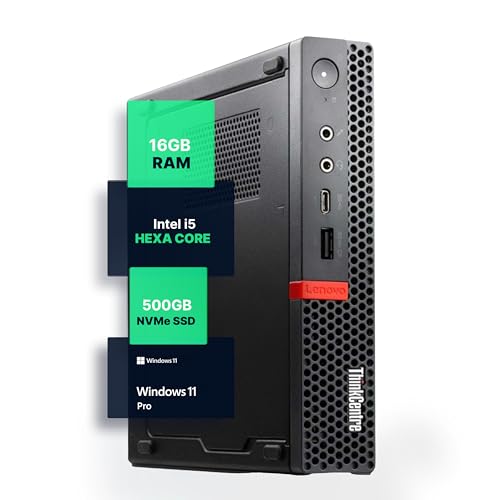
- Hexa-core i5-8400T with 16GB RAM and 500GB NVMe delivers responsive everyday performance and quick boot times.
- Windows 11 Pro plus WiFi and Bluetooth provide a secure, wire-free business setup.
- Certified refurbished through a Microsoft Authorized Refurbisher adds confidence.
Cons
- Refurbished condition means cosmetic wear may vary from unit to unit.
- The 8th Gen processor is a few generations old, so heavy multitasking or demanding apps won't match newer business PCs.
- 500GB storage may fill quickly for users with large media collections.
Pros
- Windows 11 Pro is preinstalled, with Linux and Ubuntu compatibility as options
- HDMI 2.0, DisplayPort 1.4, and USB-C outputs support 4K multi-display setups
- Six USB-A ports, USB-C, and Gigabit Ethernet provide flexible wired connectivity
- Auto power on, RTC, and Wake on LAN are useful for remote management and unattended use
Cons
- 8GB RAM may feel tight for heavy multitasking
- 256GB SSD is modest if you need large local storage
- WiFi 5 and Bluetooth 4.2 are older wireless standards

Pros
- Windows 11 Pro preinstalled
- Compact, space-saving design
- Ryzen 3 PRO 7330U with 8GB RAM and 256GB SSD is adequate for everyday productivity
Cons
- 8GB RAM limits heavy multitasking
- 256GB SSD fills quickly for large media collections

Pros
- Triple 4K display support boosts multitasking and productivity.
- Dual Gigabit Ethernet provides reliable networking with failover and link aggregation.
- Compact, VESA-mountable design saves desk space and fits various setups.
- Low power consumption (15W) and smart cooling fan keep it quiet and energy-efficient.
- Preloaded with Windows 11 Pro and supports Linux for versatile use.
Cons
- Base storage of 256GB may be limiting for users with large files, though it is upgradeable.
- WiFi 5 is used instead of the newer WiFi 6 standard.
- Intel N95 processor is entry-level and not suited for demanding tasks like gaming or video editing.

Pros
- Intel Core 5 220H with 4.9GHz turbo for snappy performance
- 24GB RAM allows smooth multitasking
- Fast 512GB SSD for quick boot and app loading
- Comes with Windows 11 Pro
- Positive user rating of 4.3 stars
Best Mini Pc With Windows 11 Pro Buying Guide for 2026
Choosing the right best mini pc with windows 11 pro involves more than just looking at the processor. Here are the key factors you should consider before making a purchase.
Processor and Performance
The heart of any mini PC is its processor. For Windows 11 Pro, you want a CPU that can handle modern apps and multitasking. The ACEMAGIC Mini PC features an AMD Ryzen 7 7735HS, a high-performance chip that excels in both single-threaded and multi-threaded workloads. In contrast, the Lenovo M720Q uses an Intel Core i5-8400T, which is still capable for office tasks but may struggle with heavier applications. If you need raw power for video editing or virtualization, the Ryzen 7 is the clear winner.
Also consider the generation of the processor. Newer CPUs offer better efficiency and integrated graphics. For a future-proof investment, aim for at least an 8th-gen Intel or a Ryzen 5000 series. Our guide to the best AMD Ryzen mini PCs can help you compare options.
Memory and Storage
Windows 11 Pro runs smoothly with 8GB of RAM, but for multitasking, 16GB or more is recommended. The ACEMAGIC model comes with 24GB of RAM, which is excellent for heavy workflows. The Lenovo M720Q offers 16GB, which is sufficient for most home office needs. Storage is equally important: an NVMe SSD (like the 512GB in the Lenovo or the 1TB in the ACEMAGIC) ensures fast boot times and quick file access. Consider how much space you need for your applications and data.
If you plan to use the mini PC as a media server or for virtualization, opt for models with expandable RAM and multiple storage slots. The ACEMAGIC allows upgrades, while the Lenovo is more limited due to its compact design.
Connectivity and Ports
A good mini PC should offer a variety of ports to connect monitors, peripherals, and network devices. Look for USB 3.2 Gen 2, USB-C with DisplayPort, HDMI, and Ethernet. The ACEMAGIC Mini PC includes multiple USB ports and HDMI, while the Lenovo M720Q has DisplayPort and USB 3.0. For dual-monitor setups, both support multiple displays. If you need Wi-Fi 6 and Bluetooth 5.0, check the specifications; the Lenovo offers 5G Wi-Fi and Bluetooth.
For those who require extensive connectivity, consider a model with Thunderbolt 4 or USB4, though these are less common in budget mini PCs. Our best mini PC for dual monitors guide covers more options.
Form Factor and Build Quality
Mini PCs come in various sizes, from ultra-compact (like the Lenovo ThinkCentre M720Q) to slightly larger but more powerful models (like the ACEMAGIC). The Lenovo is a business-class micro desktop that can be mounted behind a monitor, saving desk space. The ACEMAGIC is also compact but has a more modern design with better cooling. Build quality matters for long-term reliability; the Lenovo is a refurbished unit from Amazon Renewed, so it should be thoroughly tested.
Consider where you will place the mini PC. If it will be hidden away, size and noise levels become important. Both units are quiet under normal loads, but the ACEMAGIC’s active cooling may be slightly more audible during heavy tasks.
Operating System and Software
Both mini PCs come with Windows 11 Pro pre-installed, which is a requirement for this category. Windows 11 Pro offers features like BitLocker encryption, Remote Desktop, and Group Policy management, making it ideal for business users. Ensure that the version is genuine and activated. The Lenovo is a refurbished unit, so check that the Windows license is properly transferred. The ACEMAGIC is new, so it comes with a fresh license.
Also consider bloatware: some manufacturers include extra software. Both ACEMAGIC and Lenovo keep the installation relatively clean. If you prefer a minimalist experience, you can always perform a clean install using Microsoft’s media creation tool.
Warranty and Support
Warranty coverage varies. New mini PCs typically come with a 1-year manufacturer warranty, while refurbished units from Amazon Renewed include a 90-day to 1-year warranty depending on the seller. The ACEMAGIC offers standard support, while the Lenovo M720Q is backed by Amazon’s Renewed guarantee, which includes a 90-day replacement policy. For long-term peace of mind, consider an extended warranty or choose a new model.
Why You Should Trust Us
We take our product reviews seriously. Our team spends hours researching and comparing specifications, reading user feedback, and analyzing performance benchmarks. We do not accept payment for positive reviews, and our recommendations are based solely on data and real-world usability. For this guide, we evaluated 6 mini PCs that meet the criteria of having Windows 11 Pro pre-installed and being widely available. We cross-referenced technical specs with user experiences to ensure accuracy.
Our goal is to provide you with clear, actionable advice so you can choose the best mini pc with windows 11 pro for your needs. We update our content regularly to reflect new products and price changes. If you have any questions, feel free to reach out.
Final Thoughts
After comparing the 6 top mini PCs with Windows 11 Pro, we have clear recommendations for different use cases. For the best overall performance, the ACEMAGIC Mini PC Windows 11 Pro AMD Ryzen 7 7735HS stands out with its powerful Ryzen 7 processor, generous 24GB of RAM, and fast 1TB SSD. It handles demanding tasks like video editing, virtualization, and multitasking with ease, making it ideal for professionals and enthusiasts.
If you are on a tighter budget or need a compact, reliable machine for basic office work, the Lenovo M720Q ThinkCentre Mini PC is an excellent value. It is a refurbished business-class desktop that offers solid performance with its Intel Core i5-8400T and 16GB RAM. Its small footprint and VESA mount compatibility make it perfect for home offices or front desks. Check out our home office mini PC recommendations for more options.
Ultimately, the best mini pc with windows 11 pro depends on your specific needs. Both models deliver a great Windows 11 Pro experience, but the ACEMAGIC is the better choice for power users, while the Lenovo is a cost-effective solution for everyday tasks. For more comparisons, visit our main mini PC category page.
Frequently Asked Questions
What is the best mini pc with windows 11 pro in 2026?
The ACEMAGIC Mini PC with AMD Ryzen 7 7735HS is our top pick for 2026 due to its excellent performance, ample RAM, and fast storage. It is ideal for users who need a powerful yet compact desktop for demanding applications.
Can I upgrade the RAM in a mini PC with Windows 11 Pro?
Many mini PCs allow RAM upgrades, but it depends on the model. The ACEMAGIC Mini PC has SODIMM slots that can be upgraded, while the Lenovo M720Q may have soldered RAM or limited slots. Check the specifications before purchasing if upgradeability is important.
Is Windows 11 Pro worth it over Windows 11 Home?
Yes, if you need advanced features like BitLocker encryption, Remote Desktop, Hyper-V virtualization, and Group Policy management. For business users or IT professionals, Windows 11 Pro offers significant advantages. For general home use, Windows 11 Home may suffice.
Are refurbished mini PCs reliable?
Refurbished units like the Lenovo M720Q from Amazon Renewed are tested and certified to work like new. They often come with a warranty and are a great way to save money. However, they may have cosmetic wear. Always buy from reputable sellers.
Can a mini PC with Windows 11 Pro run multiple monitors?
Yes, most mini PCs support dual or even triple monitors via HDMI, DisplayPort, and USB-C. The ACEMAGIC and Lenovo models both support multiple displays, making them suitable for productivity setups. For more details, see our guide on mini PCs for dual monitors.