Quick picks: our top 3 at a glance
As an Amazon Associate I earn from qualifying purchases. Prices and availability change.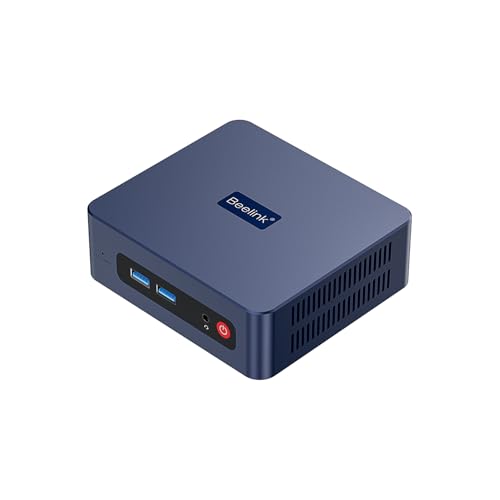


Deciding between a MINISFORUM, Beelink, GMKtec, or Geekom mini PC can feel overwhelming. All four brands offer compact, powerful desktops, but they target different users. In this comparison, we break down the key differences between 6 popular models to help you choose the right one for your needs in 2026.
We examined the GMKtec G3S, two versions of the Beelink SER3, and the high-end MINISFORUM G1 Pro. Whether you need an affordable home office PC or a gaming powerhouse, this guide covers the essential factors like processor, graphics, storage, and connectivity. Let’s dive into the details.
At a Glance
| Product | Brand | Rating | Where to buy |
|---|---|---|---|
| Beelink SER3 Ryzen 3 3200U Mini PC | Beelink | 4.9 / 5 | View on Amazon |
| GMKtec G3S N95 Mini PC (8GB/256GB) | GMKtec | 4.3 / 5 | View on Amazon |
| Beelink SER3 Mini PC (Ryzen 3, 8GB/256GB) | Beelink | 4.4 / 5 | View on Amazon |
| MINISFORUM G1 Pro Mini PC (Ryzen 9, RTX 5060) | MINISFORUM | 4.6 / 5 | View on Amazon |
| GMKtec G3 Ultra Pentium Gold 7505 Mini PC | GMKtec | 4.4 / 5 | View on Amazon |
| MINISFORUM MS-02 Ultra Core Ultra 9 285HX | MINISFORUM | 4.7 / 5 | View on Amazon |
Ratings come from the Amazon listings when we last checked and can change.
Pros
- Dual HDMI outputs support 4K@60Hz for efficient dual-monitor setups.
- Expandable memory and storage (RAM up to 32GB, M.2 and 2.5-inch SATA).
- Includes WiFi6 and Bluetooth 5.2 for modern wireless connectivity.
Cons
- Dual-core Ryzen 3 3200U limits performance for heavy multitasking or demanding applications.
- Lacks a USB-C port, which is increasingly common on modern peripherals.
- Base 8GB RAM and 256GB SSD may require immediate upgrades for power users.
Pros
- Dual SSD slots for storage expansion up to 8TB
- Dual HDMI 2.0 outputs supporting 4K@60Hz
- Compact with VESA mount included, suitable for behind monitor
Cons
- Only 8GB RAM with no upgrade option
- WiFi 5 instead of WiFi 6
- No USB-C port
Pros
- Dual 4K@60Hz HDMI ports enable a two-monitor workspace
- Four USB 3.2 (10Gbps) ports cover multiple peripherals at once
- M.2 2280 and 2.5-inch bays allow easy storage expansion up to 2TB
- Compact design with VESA mount keeps the desk uncluttered
- Active cooling with dual heat tubes helps maintain quiet daily operation
Cons
- Entry-level Ryzen 3 3200U lacks power for demanding apps or gaming
- 8GB RAM can feel tight for heavy multitasking
- WiFi 5 and lack of USB-C/DisplayPort are dated compared with current connectivity standards

Pros
- High-performance Ryzen 9 8945HX with 16 cores and 32 threads, suitable for demanding gaming and content creation.
- Dedicated NVIDIA GeForce RTX 5060 with 8GB GDDR7 for ray tracing and AI-accelerated tasks.
- Comprehensive connectivity including 5GbE, Wi-Fi 7, and support for four 4K displays.
- Quiet and efficient cooling system for sustained workloads.
Cons
- Compact design may limit future upgrade options compared to larger desktops.
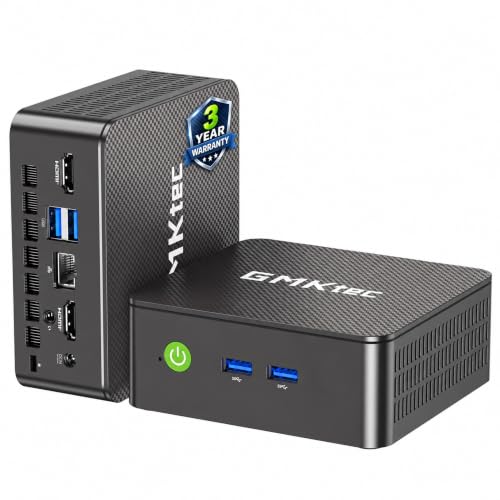
Pros
- Compact and space-saving design
- Dual HDMI 2.0 ports with 4K@60Hz support
- Wi-Fi 6 and Bluetooth 5.2 for modern wireless connectivity
- Silent cooling system
- 3-year limited warranty
Cons
- RAM is soldered and not upgradeable
- Included SSD is SATA III, slower than NVMe
- Dual-core Pentium Gold processor may limit performance for demanding tasks

Pros
- Desktop-class Intel Core Ultra 9 285HX with 24 cores and up to 5.5 GHz
- Supports up to 256GB DDR5 RAM via four SO-DIMM slots
- Dual 10GbE and 2.5GbE Ethernet ports for fast local networking
- PCIe 5.0 x16 slot for adding a dedicated GPU or other expansion cards
- Multiple USB4 and USB4 V2 ports with up to 80Gbps data transfer
Cons
- Barebone configuration requires separate purchase of RAM and SSD
- Heavier than typical mini PCs at 7.61 pounds
- No integrated GPU; relies on discrete graphics or CPU integrated graphics
Quick Verdict
- Pick the GMKtec G3S Mini PC Intel N95 Processor if you want an ultra-compact, energy-efficient mini PC for office tasks, media streaming, and light multitasking with a low budget.
- Pick the Beelink SER3 Mini PC, AMD Ryzen 3 3200U if you need a balanced performer with expandable storage and dual 4K display support for a productive home office setup.
- Pick the Beelink SER3 Mini PC, AMD Ryzen 3 3200U (alternative model) if you prefer a slightly lower price point with similar core performance but less bundled storage expansion options.
- Pick the MINISFORUM G1 Pro Gaming Mini PC 32GB DDR5 1TB SSD if you demand desktop-grade gaming performance with RTX 5060 graphics, high-speed memory, and future-proof connectivity like Wi-Fi 7.
Minisforum Vs Beelink Vs Gmktec Vs Geekom Key Differences
Processor Performance
The GMKtec G3S uses the Intel N95 (Alder Lake) with 4 cores up to 3.4GHz, ideal for basic tasks. The Beelink SER3 models rely on the AMD Ryzen 3 3200U (2 cores, 4 threads, up to 3.5GHz), offering slightly better single-core performance. The MINISFORUM G1 Pro is in a different league with the Ryzen 9 8945HX (16 cores, 32 threads up to 5.4GHz), suitable for gaming, content creation, and heavy multitasking.
If you only need a media center or office PC, the N95 is sufficient. For light gaming or multitasking, the Ryzen 3 is a step up. The Ryzen 9+RTX 5060 combo is for demanding users.
Graphics and Display Support
The GMKtec G3S features Intel UHD Graphics capable of dual 4K@60Hz via HDMI 2.0. The Beelink SER3 models have Radeon Vega 3 Graphics, also dual 4K@60Hz HDMI. Both are fine for productivity and video streaming. The MINISFORUM G1 Pro includes a full RTX 5060 with 8GB GDDR7, supporting up to quad 4K displays via DP and HDMI, and delivers ray tracing for AAA games.
For gamers or creators, the RTX 5060 is essential. For office work, the integrated graphics are adequate.
Memory and Storage
The GMKtec G3S comes with 8GB DDR4 and a 256GB M.2 SSD (2242). Both Beelink SER3 models have 8GB DDR4 RAM (expandable to 32GB) and a 256GB SSD (one uses NVMe, the other unlisted but likely SATA or NVMe). They also support an additional 2.5-inch SATA drive. The MINISFORUM G1 Pro offers 32GB DDR5 (expandable to 96GB) and a 1TB NVMe SSD with dual M.2 slots (up to 8TB total).
For basic use, 8GB+256GB is fine. Power users need the G1 Pro’s high capacity and speed.
Connectivity and Ports
GMKtec G3S: USB 3.2 Gen1, dual HDMI 2.0, Gigabit Ethernet, Wi-Fi 5, Bluetooth 5.0. Beelink SER3: 4x USB 3.2 Gen2, dual HDMI, Gigabit Ethernet, Wi-Fi 5 or 6 (depending on model), Bluetooth 5.0/5.2. MINISFORUM G1 Pro: 3x DP, 2x HDMI, multiple USB 3.2 Gen2, 5GbE, Wi-Fi 7, Bluetooth 5.4. The G1 Pro has far more advanced networking and display outputs.
For most users, the Beelink or GMKtec ports suffice. For high-speed networking and multiple monitors, the G1 Pro wins.
Size and Cooling
The GMKtec G3S and Beelink SER3 are both compact (under 1L) with passive or active cooling and VESA mount support. The MINISFORUM G1 Pro is larger at 3.8L with a custom dual-fan cooling system for its high-power components. It also has customizable RGB lighting.
If space is tight, the smaller models fit behind a monitor. The G1 Pro requires more desk space but stays quiet under load.
| Feature | GMKtec G3S | Beelink SER3 (Model 1) | Beelink SER3 (Model 2) | MINISFORUM G1 Pro |
|---|---|---|---|---|
| Processor | Intel N95 (4C/4T, 3.4GHz) | AMD Ryzen 3 3200U (2C/4T, 3.5GHz) | AMD Ryzen 3 3200U (2C/4T, 3.5GHz) | AMD Ryzen 9 8945HX (16C/32T, 5.4GHz) |
| Graphics | Intel UHD Graphics | Radeon Vega 3 Graphics | Radeon Vega 3 Graphics | NVIDIA RTX 5060 8GB GDDR7 |
| Memory | 8GB DDR4 | 8GB DDR4 (up to 32GB) | 8GB DDR4 (up to 32GB) | 32GB DDR5 (up to 96GB) |
| Storage | 256GB M.2 SSD (2242) | 256GB M.2 2280 NVMe (+ 2.5″ SATA) | 256GB NVMe SSD (+ 2.5″ SATA) | 1TB NVMe (dual M.2, up to 8TB) |
| Display Output | 2x HDMI 2.0 (4K@60Hz) | 2x HDMI (4K@60Hz) | 2x HDMI (4K@60Hz) | 3x DP + 2x HDMI (quad 4K) |
| Networking | Wi-Fi 5, BT 5.0, Gigabit Ethernet | Wi-Fi 5/BT 5.0 or Wi-Fi 6/BT 5.2 | Wi-Fi 5, BT 5.0, Gigabit Ethernet | Wi-Fi 7, BT 5.4, 5Gb Ethernet |
| USB Ports | USB 3.2 Gen1 | 4x USB 3.2 Gen2 | 4x USB 3.2 Gen2 | Multiple USB 3.2 Gen2 |
Who Should Buy Which
GMKtec G3S Mini PC Intel N95 Processor
Best for budget-conscious users who need a quiet, low-power mini PC for web browsing, office applications, and media streaming. The trade-off is limited performance for gaming or heavy multitasking. Skip this if you plan to do any video editing or run virtual machines.
Beelink SER3 Mini PC, AMD Ryzen 3 3200U
Best for home office users who want a balance of performance and expandability. This model comes with Wi-Fi 6 and Bluetooth 5.2 for better wireless connectivity. The main trade-off is the older Zen+ architecture and limited graphics. Skip this if you need modern game support.
Beelink SER3 Mini PC, AMD Ryzen 3 3200U (Alternative)
Best for price-sensitive buyers who want the same core CPU and GPU performance as the other SER3 but at a slightly lower cost. It has Wi-Fi 5 and Bluetooth 5.0, which may be fine for most networks. The trade-off is slower wireless speeds. Skip this if you need the fastest Wi-Fi.
MINISFORUM G1 Pro Gaming Mini PC 32GB DDR5 1TB SSD
Best for gamers, content creators, and professionals who need desktop-class performance in a compact form. The RTX 5060 handles AAA games and AI workloads, while the Ryzen 9 CPU excels in productivity. The trade-off is a larger size and higher investment. Skip this if your tasks are limited to browsing and documents.
Final Thoughts
Choosing between MINISFORUM, Beelink, GMKtec, and Geekom depends entirely on your workload. For a basic home media center or light office PC, the GMKtec G3S offers great value. The two Beelink SER3 models are solid mid-range options with room to grow via expandable storage. However, if you need gaming power or heavy multitasking, the MINISFORUM G1 Pro is the clear winner.
Frequently Asked Questions
Which of these mini PC brands is best for gaming?
Among the models in this comparison, the MINISFORUM G1 Pro Gaming Mini PC is the one built with gaming in mind, with 32 GB of DDR5 memory and a 1 TB SSD listed. The Beelink SER3 and GMKtec G3S are aimed at everyday and office use rather than demanding games.
Are Beelink and GMKtec mini PCs good for office work?
Based on their listed processors, an AMD Ryzen 3 3200U in the Beelink SER3 and an Intel N95 in the GMKtec G3S, both suit browsing, documents, video calls and similar light tasks. Heavy video editing or modern 3D games call for stronger hardware.
How much memory and storage do I need?
For general use, 16 GB of RAM and a 512 GB SSD is a comfortable starting point. Lighter use can work with 8 GB, while gaming or multitasking benefits from more memory and faster storage.
Is DDR5 worth it in a mini PC?
DDR5 offers more memory bandwidth, which helps integrated graphics and demanding apps, but it only matters if the rest of the system can use it. For simple office tasks, DDR4 models are often enough.
Do these mini PCs come with Windows?
Many ship with Windows preinstalled, but the edition and licensing differ by model and seller. Check the product listing for the operating system before you order.