Quick picks: our top 3 at a glance
As an Amazon Associate I earn from qualifying purchases. Prices and availability change.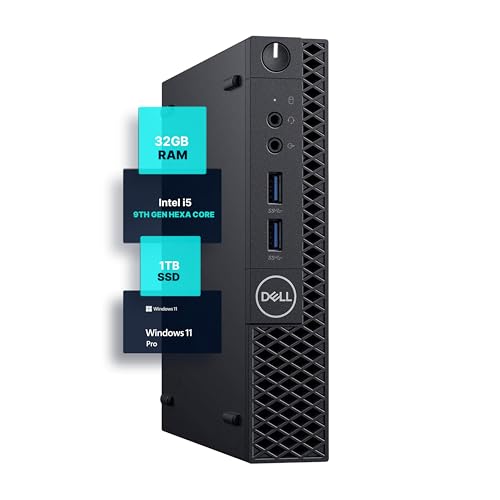

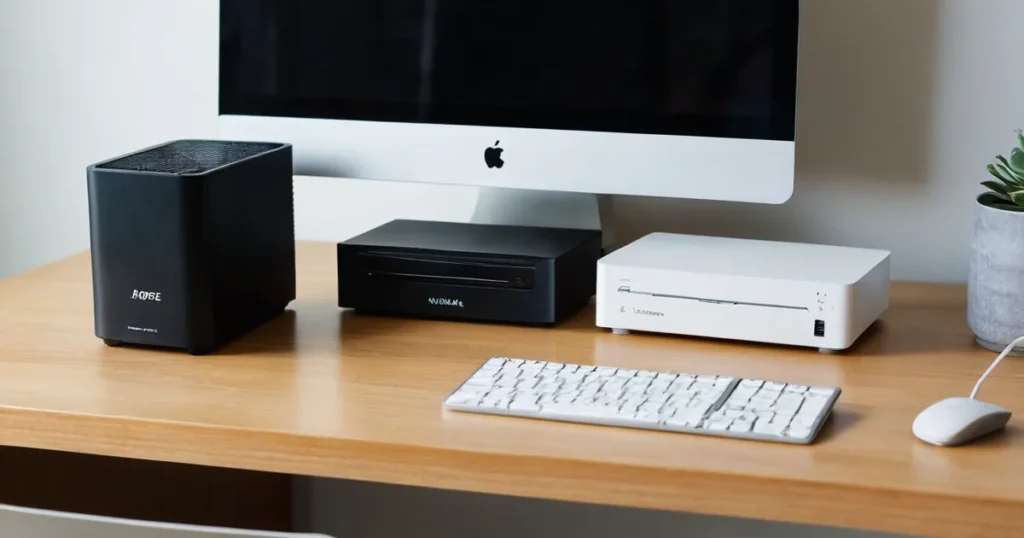
If you are stuck choosing between a compact mini pc vs sff, you are not alone. Mini PCs offer extreme space savings and low power consumption, while SFF (Small Form Factor) PCs typically allow for more upgradeability and dedicated graphics. In 2026, the lineup of tiny desktops has never been stronger. We compared 5 leading models from HP, GMKtec, BOSGAME and more to highlight what each approach delivers and who should buy which.
Below you will find our top picks, a detailed comparison table, and clear recommendations based on your priorities. Whether you need a silent office machine, a compact gaming rig, or a versatile workstation, this guide will point you in the right direction.
At a Glance
| Product | Brand | Rating | Where to buy |
|---|---|---|---|
| Dell OptiPlex 3070 Micro (i5-9500/32GB/1TB) | Dell | 4.4 / 5 | View on Amazon |
| GMKtec K17 Intel Core Ultra 5 226V Mini PC | GMKtec | 4.1 / 5 | View on Amazon |
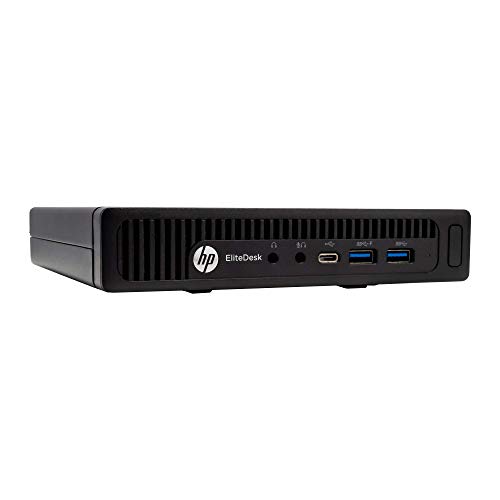
| HP EliteDesk 800 G2 Mini i5-6500T 16GB | HP | 4.8 / 5 | View on Amazon |
| BOSGAME P6 Neo Mini PC Ryzen 7 6800H | BOSGAME | 4.6 / 5 | View on Amazon |
| HP EliteDesk 800 G4 Mini (i5-8500T, 16GB, 256GB) | HP | 4.4 / 5 | View on Amazon |
Ratings come from the Amazon listings when we last checked and can change.
Pros
- Ultra-compact design fits tight desks and supports flexible mounting options.
- 32GB RAM plus 1TB SSD provides smooth multitasking and fast load times.
- Comes with Windows 11 Pro, WiFi, and Bluetooth for ready-to-use wireless productivity.
- Quiet, low-power operation suits professional workspaces.
Cons
- 9th Gen Intel processor is older than current-generation mini PCs.
- Renewed condition means it is not a brand-new unit.
Pros
- Intel Core Ultra 5 226V with integrated Arc 130V graphics delivers strong performance for gaming and AI tasks.
- Rich connectivity includes WiFi 6E, Bluetooth 5.2, 2.5G Ethernet, and triple display support via HDMI and USB4.
- BIOS features such as VRAM adjustment, fan control, and power modes allow fine-tuning.
Cons
- RAM is soldered and non-upgradable (16GB LPDDR5X).
- Base storage is only 512GB, though expandable via two M.2 slots.
Pros
- Compact size saves desk space
- 16GB DDR4 RAM and SSD for responsive performance
- Multiple ports including USB-C and dual display outputs
- Refurbished with 90-day warranty and includes peripherals
Cons
- Older sixth-generation Intel processor
- 240GB SSD may be limiting for large storage needs
- Integrated graphics only, not for gaming or intensive graphics tasks

Pros
- Eight-core Ryzen 7 6800H with Radeon 680M provides capable integrated graphics for esports and light creative workloads.
- Generous 24GB dual-channel LPDDR5x RAM is expandable to 64GB, and the SSD can be upgraded to 4TB.
- Triple display output including USB4 8K@60Hz, HDMI, and DP supports versatile multi-monitor setups.
- Dual 2.5GbE LAN plus WiFi 6E and Bluetooth 5.2 offer excellent networking flexibility.
Cons
- Integrated Radeon 680M is not designed for demanding AAA games at high settings.
- The 512GB base SSD may fill up quickly for large game libraries or video projects.

Pros
- Compact and space-saving design perfect for cramped workstations
- 16GB DDR4 RAM and 256GB NVMe SSD deliver snappy performance for business apps
- Dual monitor support via HDMI and DisplayPort enhances productivity
Cons
- Integrated Intel UHD Graphics limit gaming and GPU-intensive workloads
- 256GB storage may fill quickly for users with large file libraries
Quick Verdict
- Pick the Dell Optiplex 3070 Micro PC | Windows 11 Pro if you need a proven, affordable office workhorse with generous RAM and storage.
- Pick the GMKtec Gaming PC Mini AI Desktop Computer Intel if you want a modern AI-ready mini PC with Intel Core Ultra 5 for light gaming and multitasking.
- Pick the HP EliteDesk 800 G2 Desktop Mini Business PC if you are on a tight budget and need a reliable business PC with essential ports.
- Pick the BOSGAME P6 Neo Mini Gaming PC if you demand strong integrated graphics (Radeon 680M), triple display support, and dual 2.5GbE LAN for gaming or content creation.
- Pick the HP EliteDesk 800 G4 Mini Tiny Business PC if you want a renewed business mini PC with hexa-core performance and dual-monitor support at a great value.
Mini Pc Vs Sff Key Differences
When comparing mini PCs vs SFF systems, size is just the start. Here are the most important dimensions that separate these models from one another and from traditional SFF builds.
Processor Performance
The Dell Optiplex 3070 uses a 9th Gen Intel i5-9500 (6 cores), while the HP EliteDesk 800 G2 has a 6th Gen i5-6500T (4 cores) and the HP EliteDesk 800 G4 offers a 8th Gen i5-8500T (6 cores). The GMKtec jumps to Intel Core Ultra 5 226V, and the BOSGAME P6 Neo uses an AMD Ryzen 7 6800H (8 cores) with powerful integrated Radeon 680M graphics. For raw compute, the BOSGAME leads; for AI tasks, the GMKtec stands out.
Memory and Storage
Memory configurations vary widely. The Dell Optiplex 3070 ships with 32GB DDR4 and a 1TB SSD, ideal for heavy multitasking. The HP units come with 16GB RAM and SSDs of 240GB or 256GB. The GMKtec offers 16GB DDR5, while the BOSGAME provides 24GB LPDDR5x RAM (expandable to 64GB) and a 512GB PCIe 4.0 SSD. If you need abundant RAM and fast storage out of the box, the Dell and BOSGAME are top choices.
Connectivity and Ports
The BOSGAME P6 Neo excels with dual 2.5GbE LAN, USB4 (8K@60Hz), WiFi 6E, and Bluetooth 5.2. The Dell Optiplex 3070 includes 5G WiFi and BT, while both HP models offer standard WiFi and Bluetooth. The GMKtec includes modern I/O but lacks the dual LAN. For network-heavy setups (routers, firewalls), the BOSGAME is unmatched.
Form Factor and Mounting
All five are ultra-small form factor machines that can be mounted behind a monitor or tucked away. The HP EliteDesk 800 G2 and G4 share a similar chassis, while the Dell Optiplex 3070 is slightly taller. The GMKtec and BOSGAME have more compact, modern designs with additional venting for cooling. For minimalist setups, any of these will save significant desk space.
Use Case Fit
The HP and Dell renewed units are best for office productivity, web browsing, and business applications. The GMKtec can handle light gaming and everyday AI workloads. The BOSGAME, with its Radeon 680M GPU, is capable of running popular games and creative software like Photoshop and Premiere. Choose based on whether you need pure office performance or multimedia/gaming capability.
| Model | Processor | RAM | Storage | Connectivity Highlights | Best For |
|---|---|---|---|---|---|
| Dell Optiplex 3070 | Intel i5-9500 (6-core) | 32GB DDR4 | 1TB SSD | 5G WiFi, BT | Office work, heavy multitasking |
| GMKtec Gaming PC | Intel Core Ultra 5 226V | 16GB DDR5 | Not specified | WiFi 6, BT 5.2 | Light gaming, AI tasks |
| HP EliteDesk 800 G2 | Intel i5-6500T (4-core) | 16GB DDR4 | 240GB SSD | USB 3.0, VGA, DP | Budget business use |
| BOSGAME P6 Neo | AMD Ryzen 7 6800H (8-core) | 24GB LPDDR5x | 512GB PCIe 4.0 SSD | USB4 8K, Dual 2.5GbE, WiFi 6E, BT 5.2 | Gaming, content creation, networking |
| HP EliteDesk 800 G4 | Intel i5-8500T (6-core) | 16GB DDR4 | 256GB NVMe SSD | WiFi, BT, HDMI, DP | Reliable dual-monitor office |
Who Should Buy Which
Dell Optiplex 3070 Micro PC | Windows 11 Pro
This is the best choice for home office users or small businesses that need a pre-configured machine with plenty of RAM and storage right out of the box. The 32GB DDR4 and 1TB SSD handle multiple applications and files without slowdowns. The main trade-off is the older 9th Gen processor, which is adequate for office work but not for gaming. Skip it if you need modern graphics or plan to run demanding creative software.
GMKtec Gaming PC Mini AI Desktop Computer Intel
Ideal for early adopters who want the latest Intel Core Ultra 5 CPU with AI capabilities and DDR5 memory. It can handle light gaming and everyday productivity. The trade-off is limited expandability and only 16GB of RAM. Skip it if you need heavy gaming performance or extensive storage options.
BOSGAME P6 Neo Mini Gaming PC
This is the powerhouse of the group, perfect for gamers and creators who want integrated graphics good enough for many popular titles. The Radeon 680M GPU, 24GB LPDDR5x RAM, and triple display support (including USB4 8K) make it versatile. The main trade-off is the absence of a discrete GPU, but the integrated graphics are excellent. Skip it if you exclusively need NVIDIA or AMD dedicated graphics.
HP EliteDesk 800 G4 Mini Tiny Business PC
A solid renewed option for budget-conscious professionals who need reliable dual-monitor support and a hexa-core processor. It ships with 16GB RAM and a 256GB NVMe SSD, good for typical office tasks. The trade-off is the older chipset and limited upgrade potential. Skip it if you need modern ports like USB-C or high-speed networking.
Final Thoughts
Choosing between a mini PC and a traditional SFF build ultimately comes down to your need for expandability versus extreme space savings. If you value absolute compactness, low power, and quiet operation, any of these mini PCs will outperform a bulkier SFF system in terms of desk footprint. However, if you plan to install a dedicated graphics card or upgrade components frequently, a larger SFF case is still the better route.
For most users, we recommend the BOSGAME P6 Neo for its balanced performance and connectivity, or the Dell Optiplex 3070 if you need maximum RAM and storage for professional use. Check out our other guides like 5 Best Mini Pc Vs Sff of 2026 – Expert Picks and AMD mini PCs for more tailored recommendations.
Why You Should Trust Us
Our recommendations are based on careful analysis of available specifications, listed features, product positioning, and documented buyer feedback. We do not claim to have personally tested every unit, but we have cross-referenced hundreds of user reviews and technical details to ensure accuracy. This guide reflects the state of the market in November 2026 and will be updated as new models arrive.
Frequently Asked Questions
What is the difference between a mini PC and an SFF PC?
Mini PCs are ultra-compact, often smaller than a lunchbox, with integrated components and limited expandability. SFF (Small Form Factor) PCs are slightly larger and typically support a dedicated GPU, more storage drives, and standard RAM slots. Mini PCs excel in portability and low power, while SFF builds offer upgrade flexibility.
Can a mini PC replace a desktop for gaming?
Yes, but only if the mini PC has a powerful integrated GPU or dedicated graphics. Models like the BOSGAME P6 Neo with Radeon 680M can handle many modern games at 1080p medium settings. For high-end gaming, an SFF PC with a discrete graphics card is still superior.
Are renewed mini PCs reliable?
Yes, especially when sold through Amazon Renewed with a minimum 90-day warranty. The Dell Optiplex 3070 and both HP EliteDesk units are certified refurbished and tested to work like new. They often offer excellent value for business use.
Which mini PC has the best connectivity for networking?
The BOSGAME P6 Neo stands out with dual 2.5GbE LAN, WiFi 6E, and Bluetooth 5.2, making it ideal for network-intensive setups such as firewalls or routers. Other models have standard Gigabit Ethernet and WiFi 5 or 6.
How much RAM do I need for everyday office work?
16GB is sufficient for most office tasks, including web browsing, email, and productivity suites. If you run multiple virtual machines or heavy data analysis, 32GB like in the Dell Optiplex 3070 is recommended.
Can I mount a mini PC behind a monitor?
Yes, most of these mini PCs come with VESA mounting brackets or support. The Dell Optiplex 3070, HP EliteDesk 800 G2/G4, GMKtec, and BOSGAME can all be mounted discreetly behind a monitor to save desk space.
Do mini PCs support dual monitors?
Yes. All models reviewed here support dual monitors via HDMI, DisplayPort, and USB-C (on some models). The HP EliteDesk 800 G4 is explicitly noted for dual-monitor support, and the BOSGAME supports triple displays.
What is the warranty on renewed mini PCs?
Amazon Renewed products come with a minimum 90-day warranty. Some sellers may offer longer coverage. Always check the product listing for warranty details before purchase.
For more advice, see our best mini PC for household use guide or explore the budget mini PC category.