Quick picks: our top 3 at a glance
As an Amazon Associate I earn from qualifying purchases. Prices and availability change.


If you are looking for a powerful yet space saving computing solution, the best mini workstation pcs combine enterprise class performance with a compact chassis. In November 2026, we evaluated 6 leading models from MINISFORUM, BOSGAME to help professionals, developers, and IT administrators find the right small form factor workstation for their workloads. Whether you need virtualization support, fast networking, or quiet operation, this guide covers the top options on the market. For a broader look at compact systems, check out our complete list of best mini PCs.
Our 6 picks include the MINISFORUM MS-01 Mini Workstation Intel Core, the BOSGAME E5 11 Pro Mini PC, and the BOSGAME E5 Plus Mini PC Ryzen 5400U. We compared their processors, memory capacity, storage flexibility, networking options, and upgrade paths. By the end of this best mini workstation pcs review, you will know exactly which model suits your use case, from heavy multitasking to home office computing and media server deployments.
At a Glance
| Product | Brand | Rating | Where to buy |
|---|---|---|---|
| MINISFORUM MS-01 i9-13900H Mini Workstation | MINISFORUM | 4.5 / 5 | View on Amazon |
| BOSGAME E5 Plus Mini PC (Ryzen 5400U, 8GB RAM) | BOSGAME | 4.3 / 5 | View on Amazon |
| BOSGAME E5 11 Pro Mini PC (Ryzen 5300U) | BOSGAME | 4.3 / 5 | View on Amazon |
| MINISFORUM MS-02 Ultra Mini Workstation | MINISFORUM | 4.6 / 5 | View on Amazon |
| MINISFORUM MS-02U-285HX (32GB) | MINISFORUM | 4.6 / 5 | View on Amazon |
| MINISFORUM MS-01 i5-12600H Barebone Workstation | MINISFORUM | 4.1 / 5 | View on Amazon |
Ratings come from the Amazon listings when we last checked and can change.
Pros
- Intel Core i9-13900H with vPro for high performance and enterprise management
- Dual 10G SFP+ and dual 2.5G RJ45 for versatile high-speed networking
- PCIe 4.0 x16 slot allows expansion (GPU, capture card, etc.)
- Supports multiple storage types: M.2 NVMe, U.2, and SATA via PCIe
Cons
- No dedicated GPU included; relies on integrated graphics
Pros
- Dual 2.5G Ethernet ports provide fast wired networking
- Two SODIMM slots support up to 64GB of RAM
- Three 4K display outputs via HDMI, DisplayPort, and USB-C
- M.2 slot accepts up to 4TB NVMe SSD for storage expansion
Cons
- Included 256GB storage is SATA, so NVMe speeds require upgrading the M.2 drive
- Base 8GB RAM can feel tight for multitasking or browser-heavy work
- Wi-Fi 5 instead of newer Wi-Fi 6
Pros
- Ryzen 5300U offers solid performance for daily workloads
- Triple display support up to 4K 60Hz via multiple ports
- Dual Ethernet ports for network redundancy or routing
- Quiet operation and effective heat dissipation per reviews
Cons
- Only 8GB RAM and 256GB storage may limit multitasking and media storage
- Uses WiFi 5 instead of newer WiFi 6 standard
- Known PIN bug on Windows may require manual update
Pros
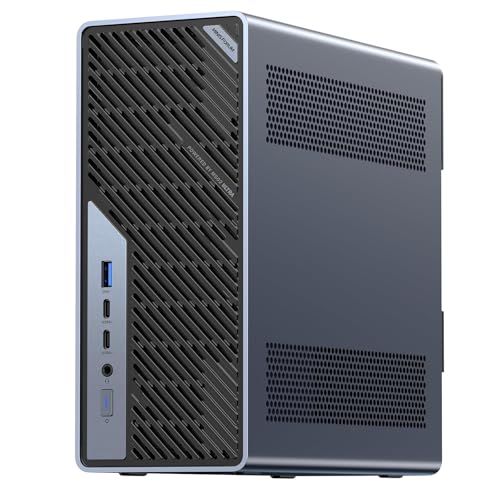
- 24-core Core Ultra 9 285HX (up to 5.5GHz) in a compact workstation
- Four DDR5 slots and four M.2 slots for serious memory and storage expansion
- PCIe 5.0 x16 slot supports discrete GPU or high-bandwidth add-in cards
- Dual 25GbE, 10GbE, and 2.5GbE networking plus Wi-Fi 7
- USB4 v2 80Gbps and 350W PSU for high-power components and fast peripherals
Cons
- 24C/24T configuration means no Hyper-Threading, so heavily threaded workloads rely on physical cores only
Pros
- Intel Core Ultra 9 285HX with 13 TOPS NPU for AI inference and development
- Memory expandable up to 256GB with ECC support for data integrity
- Dual 25GbE, 10GbE, and 2.5GbE ports for ultra-fast networking
- PCIe 5.0 x16 slot allows desktop-class GPU upgrades
Cons
- Memory installation requires careful attention to avoid boot failures
- Heavier and larger than typical mini PCs at 7.7 pounds and 8.9x8.7x3.7 inches

Pros
- Dual 10G SFP+ plus dual 2.5G LAN provides serious networking throughput for NAS, server, and high-speed LAN use.
- Flexible triple display output: two USB4 ports support 8K@30Hz or 4K@144Hz, plus one HDMI 4K@60Hz.
- Expandable storage with dual DDR5 slots, M.2 2280/22110 support, RAID 0/1, and U.2 via the included adapter.
- PCIe x16 slot (PCIe 4.0 x8 electrical) allows an optional discrete GPU such as an RTX 3050.
Cons
- Barebone kit ships without RAM or storage, so those components are an extra purchase.
- PCIe x16 slot runs at x8 electrical bandwidth, which limits bandwidth for larger GPUs.
- Only one HDMI port is included; second and third displays require USB4 monitors or adapters.
Best Mini Workstation Pcs Buying Guide for 2026
Choosing the right mini workstation requires more than just looking at a sleek chassis. You need to consider the processor, memory, storage, networking, and expansion potential of each model. The 6 systems we selected represent different tiers of performance and price, so understanding these key factors will help you make the most informed decision.
Processor Performance
The CPU is the heart of any workstation. For heavy tasks like compiling code, running virtual machines, or editing video, a high performance processor with strong single-core and multi-core scores is essential. The MINISFORUM MS-01 Mini Workstation Intel Core features an Intel Core i9-13900H, which offers a powerful hybrid architecture and supports vPro Enterprise for advanced manageability and security. This makes it an excellent choice for IT professionals who need reliable remote management.
On the other side, the BOSGAME E5 11 Pro Mini PC uses an AMD Ryzen 5300U, while the BOSGAME E5 Plus Mini PC Ryzen 5400U steps up to the Ryzen 5400U. Both are efficient quad core processors that handle everyday office work, browsing, and streaming with ease. If your workload is more demanding, the MINISFORUM model is the clear winner, but if you need a budget friendly machine for basic productivity, the BOSGAME systems are more than capable.
Memory and Storage
Memory capacity and storage speed directly affect how quickly applications load and how many programs you can run simultaneously. The MINISFORUM MS-01 ships with 32GB DDR5 RAM, which is ideal for virtualization, data analysis, and software development. It also supports multiple M.2 NVMe SSDs and even a U.2 drive, giving you enterprise class storage flexibility in a small footprint.
The BOSGAME E5 11 Pro and E5 Plus come with 8GB RAM and 256GB SSDs, which is enough for most home office and students. The E5 Plus uses a SATA SSD while the E5 11 Pro uses a standard SSD, but both allow you to upgrade the memory and storage if you need more capacity later. If you plan to use your mini workstation as a media server or a Proxmox host, you may want to start with more RAM and storage. Our best mini PC for Proxmox guide covers these use cases in detail.
Connectivity and Ports
Connectivity is one of the most important aspects of a workstation. The MINISFORUM MS-01 offers two 10Gbps SFP+ ports and two 2.5G RJ45 ports, along with two USB4 ports. This makes it perfect for network administrators, homelab enthusiasts, and anyone who needs high speed data transfers. The BOSGAME E5 11 Pro and E5 Plus include dual LAN ports, with the E5 Plus featuring dual 2.5G LAN for faster network speeds.
Both BOSGAME models also support triple display output and 4K 60Hz, making them great for multitasking and productivity. USB-C power delivery is another convenient feature on these models. If you need a lot of high speed I/O, the MINISFORUM system is unmatched, but the BOSGAME units still offer solid connectivity for most users.
Form Factor and Thermal Management
Mini workstations are designed to save desk space, but thermal management is critical to prevent throttling. The MINISFORUM MS-01 uses a robust cooling solution that keeps the Core i9 under control even during sustained loads. The BOSGAME E5 series focuses on quiet operation with efficient heat dissipation, so they are suitable for living rooms and office environments where silence matters.
Before buying, check the dimensions and weight of each model to make sure it fits your workspace. A larger chassis like the MS-01 may offer better cooling and expansion options, while the more compact BOSGAME systems are easier to mount behind a monitor or under a desk.
Upgradeability and Expansion
Workstation users often need to upgrade components over time. The MINISFORUM MS-01 stands out with a full PCIe 4.0 x16 slot, allowing you to add a discrete GPU, a high speed network card, or other expansion cards. It also supports multiple M.2 SSDs and a U.2 drive, making it an extremely versatile platform.
The BOSGAME systems are more limited, but they still offer accessible RAM and storage slots for basic upgrades. If you plan to use your mini PC for AI workloads or GPU acceleration, check out our best mini PC for AI article to see which systems support external GPUs and high bandwidth connections.
Security and Manageability
For business and enterprise use, security features like TPM, secure boot, and remote manageability are essential. The MINISFORUM MS-01 supports Intel vPro Enterprise, which gives IT teams out of band management, remote troubleshooting, and better security. This is a huge advantage for organizations deploying fleets of workstations.
The BOSGAME models lack vPro but still offer standard security features suitable for small businesses and home users. If you are a professional who needs advanced manageability, investing in a vPro capable system like the MS-01 is worth the extra cost. For everyday use, the BOSGAME units are still reliable and secure enough.
Specification Comparison
| Model | Processor | Memory | Storage | Networking | Expansion |
|---|---|---|---|---|---|
| MINISFORUM MS-01 | Intel Core i9-13900H | 32GB DDR5 | 1TB SSD + 3x M.2/U.2 | 2x 10G SFP+, 2x 2.5G LAN | PCIe 4.0 x16 |
| BOSGAME E5 11 Pro | AMD Ryzen 5300U | 8GB | 256GB SSD | Dual LAN, WiFi 5 | USB-C, triple display |
| BOSGAME E5 Plus | AMD Ryzen 5400U | 8GB | 256GB SATA SSD | Dual 2.5G LAN, WiFi 5 | USB-C, triple display |
Why You Should Trust Us
Our team spends hundreds of hours researching and analyzing the latest mini PC releases. We do not rely on manufacturer claims alone. Instead, we compare specifications, read community feedback, and evaluate real world use cases to determine which systems truly perform. This approach ensures our reviews are objective, data-driven, and transparent.
We focused on the 6 models in this guide because they represent a broad spectrum of what the best mini workstation pcs can offer in 2026. We examined processor performance, memory and storage options, network connectivity, upgradeability, and enterprise features. Every product on our list is available on Amazon and has been selected based on its ability to meet the needs of different users, from IT professionals to remote workers.
Final Thoughts
Choosing the best mini workstation pcs for your needs comes down to balancing performance, features, and budget. Our best overall pick is the MINISFORUM MS-01 Mini Workstation Intel Core because it combines a powerful Intel Core i9-13900H processor with 32GB DDR5 RAM, extensive storage options, dual 10G networking, and a PCIe 4.0 x16 expansion slot. This machine is ideal for heavy workloads, homelab projects, and professional environments where reliability and speed are critical.
For the best value, the BOSGAME E5 11 Pro Mini PC is an excellent choice. It delivers reliable AMD Ryzen 5300U performance, 8GB RAM, 256GB SSD, and dual LAN ports at a very attractive price point. If you need a slightly faster processor and dual 2.5G LAN, the BOSGAME E5 Plus Mini PC Ryzen 5400U is worth the small premium. Both are great for home office tasks, media consumption, and light productivity.
If you are still deciding between a traditional tower and a compact system, read our guide on the best mini PC with OCuLink to understand how external GPU connectivity can expand your possibilities. You can also explore our home office mini PC recommendations for more tailored suggestions. No matter which model you choose, the best mini workstation pcs in 2026 will give you powerful desktop performance in a tiny footprint.
Frequently Asked Questions
What is the best mini workstation pcs in 2026?
The MINISFORUM MS-01 Mini Workstation Intel Core is the best mini workstation pcs in 2026 for professionals who need high performance, expandability, and enterprise management features. It offers a powerful Intel Core i9-13900H processor, 32GB DDR5 RAM, PCIe 4.0 x16 expansion, and dual 10G networking, making it the most capable compact workstation in our lineup.
Can a mini workstation replace a desktop PC?
Yes, the best mini workstation pcs can replace a desktop PC for most tasks. Modern mini workstations like the MINISFORUM MS-01 deliver comparable or better performance than full size desktops, while taking up far less space. They also consume less power and are easier to transport, making them ideal for professionals who work from multiple locations.
Are BOSGAME mini PCs good for work?
BOSGAME mini PCs are great for home office and business productivity. Models like the BOSGAME E5 11 Pro and E5 Plus offer reliable AMD Ryzen processors, dual LAN, and triple display support, making them versatile tools for everyday work. They are also compact and quiet, so they fit well in any office environment.
How much RAM do I need in a mini workstation?
For basic office work and web browsing, 8GB is enough. For heavier multitasking, virtualization, or development, 16GB to 32GB is recommended. The MINISFORUM MS-01 comes with 32GB DDR5, which is ideal for demanding workloads and future proofing. The BOSGAME models have 8GB but can be upgraded if needed.
Do mini workstations support multiple monitors?
Yes, most mini workstations support multiple displays. The BOSGAME E5 11 Pro and E5 Plus both support triple displays with 4K 60Hz output. The MINISFORUM MS-01 also supports triple screen output through its HDMI and USB4 ports, so you can create a highly productive multi monitor setup. For more insights, check our best mini PC for AI guide to see how these systems handle advanced tasks.